

le-idc3 VESA adapter (V2)
The VESA adapter is compatible with the following Lenovo products (lenovo.com):
IdeaCentre AIO 3 27 (R3-Windows 11 Home-8GB-512GB)
IdeaCentre AIO 3 27 (R5-Windows 11 Home-16GB-512GB)
IdeaCentre AIO 3 27 (R7-Windows 11 Home-16GB-1TB)
IdeaCentre AIO 3 Gen 6
IdeaCentre AIO 3i 24 (i5-Windows 11 Home-16GB-512GB)
IdeaCentre AIO A340-24ICK
ThinkCentre Nea 30a
With the VESA adapter, you can easily attach your LENOVO All-in-One PC to a monitor arm with a VESA hole pattern (75 x 75 mm). Use the supplied screws and nuts for this.
Direct wall mounting is NOT possible, as the VESA adapter already contains metric threads through which no screws can be inserted for mounting to the wall.
Important Safeguards
 |
Please read this manual carefully and keep it for future reference. If you pass the product on to third parties, this manual should always be included. Ignoring these instructions may result in injuries or damage to people and products, for which we cannot accept any liability. |
||||||
IMPORTANT - KEEP FOR FUTURE REFERENCE.
• The use of this product should always be in accordance with the specified safety instructions.
• Do not install your VESA adapter in combination with the monitor in places where people are located below.
• Do not exceed the maximum weight of the compatible monitor models, as this may result in serious injuries or property damage.
• Pay attention to the maximum ambient temperature of 35°C when using the product.
• Do not mount the VESA adapter near a heat source or in direct sunlight, as this may cause the adapter to overheat.
• Check if your mounting point (e.g., monitor arm) can support the weight of the monitor with the VESA adapter.
• The product is designed exclusively for mounting with a hole pattern of 75x75 / 100x100mm / 200x200mm.
• After installing the VESA adapter, the position of the monitor must be readjusted to ensure proper ergonomics.
⚠ WARNING
Ensure that the device is turned off and disconnected from the power supply before installation to avoid possible injuries or damage.
1. Before First Use
Check the product carefully for possible transport damage and for the absence of accessories, such as screws, which should be included in the scope of delivery.
⚠ CAUTION
Make sure that packaging materials and small screws and parts contained therein are inaccessible to children to minimize the risk of choking and other risks.
2. Maintenance and Cleaning
2.1 Maintenance
- It is recommended to check every three months that all screws are still tight. Also, regularly check the condition of all components of the product.
- Store the product in a cool and safe place, ideally at a maximum storage temperature of 40°C. For additional safety, keep the product away from children and preferably in its original packaging.
- Avoid any vibrations and shocks so as not to affect the life and functionality of the product.
2.2 Cleaning
- No corrosive or hot cleaning agents should be used to clean the product. Likewise, wire brushes, metal or other sharp materials are unsuitable for cleaning and should not be used.
- For gentle and effective cleaning, the use of a soft, damp cloth is recommended.
3. Waste Disposal
For the disposal of this product we recommend to contact the responsible local authorities or disposal services. They can provide you with detailed information on available disposal options and recycling centers in your area.
4. Manufacturer Information
3idee S.à r.l.
19 Rue de Bitbourg
L-1273 Luxembourg
Luxembourg
mail: info@3idee.eu
5. Help and Feedback
If you need help with your article, we are here for you. We also appreciate any feedback.
https://help.3idee.eu/en/contact
Scope of Delivery Accessories
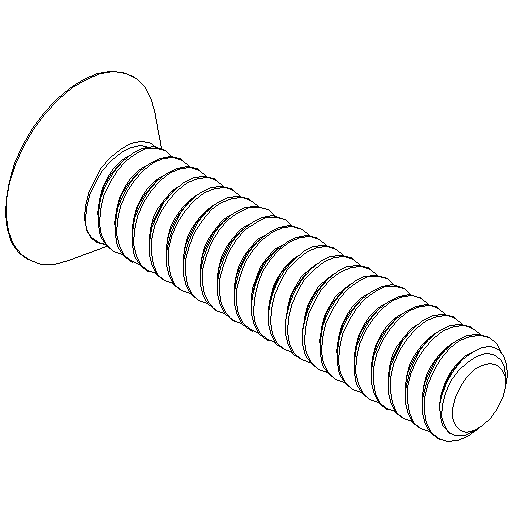
4x M3x8 Countersunk Screw
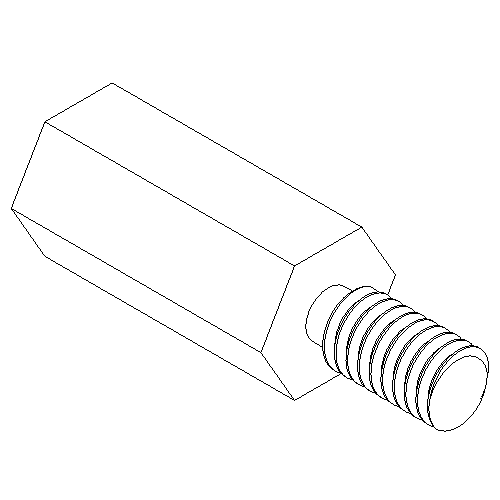
4x M3 Spacer Nut
Horizontal / Vertical Alignment
Please note: Not all VESA adapters and monitors are designed for vertical (upright) orientation. This limitation is often due to the specific geometry of the adapter or monitor. Do not ignore this information, as the load limit of the adapter can quickly be exceeded if not installed properly.
We are continuously working on developing monitors and adapters that are also suitable for vertical orientation.
However, monitors are designed for horizontal alignment by default.
Horizontal Mounting: YES

Vertical Mounting: YES

Assembly Instruction
Step 1
Place your Lenovo All-in-One PC face down on a soft surface. Remove the original stand. To do this, take off the white, semi-circular cover and unscrew the 4 screws.
Step 2
Insert the 4 spacers into the threads on the back of the Lenovo PC. Screw them in straight and only tighten them by hand.
(Figure 1)
le-idc3_ANLEITUNG-step1-2.png) Figure 1
Figure 1
Step 3
Place the VESA adapter on the spacers. The larger cutout should face upwards towards the top edge of the PC. Secure the adapter with the 4 screws.
(Figure 2)
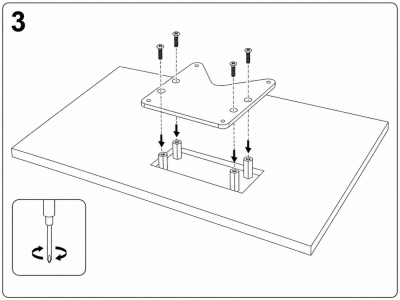 Figure 2
Step 4
Now attach the monitor arm or wall mount to the VESA adapter. Make sure everything is aligned properly and tighten the screws evenly.
le-idc3_ANLEITUNG-step4-v2.png)